Demystifying Mass Device Enrollment Programs
Author: 42Gears Team

Bringing automation in business processes enables quick completion of tasks which saves time and money. Organizations are continuously adopting more and more automation techniques to improve business processes and to enhance business values.
In order to achieve quick and effective mobile device deployments, enterprises are embracing the idea of getting these deployments done through Mass Device Enrollment Programs (MDEP) offered by market leaders such as Apple (DEP), Google (ZTP), Samsung (KME), Zebra (StageNow) and Microsoft (Windows Autopilot).
This paper will detail out different deployment programs and their availability for a particular device or version.
Companies are deploying a large number of devices to mobilize their workforce. However, the device deployment process is full of challenges, such as selecting the right hardware, OS compatibility and configuring them as per company policies. So far, the mass device enrollment process was carried out manually and had been a struggle for enterprises. It usually takes weeks or months to get the devices work as per company’s requirements.
Consider the use case for a taxi services company where 1000 devices are to be deployed to drivers. The process begins with the purchase of devices, after which, the devices are booted up and linked to a Wi-Fi network. Then an EMM agent is installed and configured so devices can connect to an EMM portal. Once that is done, the EMM solution can push the required apps, policies and settings into the devices. The entire process can take weeks if done manually. Also, in many cases, companies may be required to hire trained professionals to execute the tasks, which is a time consuming and strenuous job.
Today, enterprises have the choice to automate device deployment by embracing mass device enrollment programs from tech giants such as Google, Apple, Samsung, Zebra and Microsoft. These programs ease the entire enrollment process, allowing companies to configure the devices with less time and effort. Moreover, these enrollment programs can be easily integrated with the third party EMM vendors to perform EMM tasks such as managing devices remotely, pushing and updating apps.
This paper will further explore the mass device enrollment options available in the market, their features and workflow.
1. Manual mass device provisioning and deployment is time-consuming and strenuous
Deploying few devices manually might be easy, but when the deployment comprises of thousands of devices or more, it can take much longer. Admins would be required to repeat the entire process (as explained above) manually for every device they want to run, which is strenuous and monotonous for them. MDEP (Mass Deployments Programs) can help automate these steps and save lots of productive hours and effort for the admin.
2. Manual deployments are more prone to error
Manual labor can’t match the accuracy provided by an automatic system. Manual deployments can be error prone. Suppose a company wants to configure different EMM policies and apps for devices used in different regions. Apps available to a New York worker should not be available on California devices. When enrolled manually, admin needs to be careful to specify device region correctly at time of enrollment, else wrong set of apps and policies might get deployed.
Using MDEP, EMM configuration, per device, can be bound to its serial number (or IMEI) before even opening the device box. Once device boots up and connects to a network, it automatically receives its policies based on its serial number, thus eliminating the chances of error.
3. Professional training is required in manual device provisioning
In order to provision the devices manually, there are some precise steps to be followed. The admin must either hire external trained professionals or train in-house professionals to complete the steps. Whereas, mass enrollment programs are very easy to execute and requires minimal professional training, allowing companies to save on labor cost and time.
4. Re-provisioning is required after factory reset
Even if enterprises somehow manage to manually provision the devices, what happens when the devices undergo a factory reset while they are in use or at site? It can be very difficult to provision the devices again with all the previous settings. Either a qualified person will have to travel onsite where the devices are present or they would have to bring device back to IT office. Both the situations can be quite difficult for companies operating over a large geographical area. Also, in both the cases all the manual enrollment steps will have to be repeated.
MDEP, on the other hand, automatically re-provisions the device on every factory reset.
Mass enrollment programs are different for different devices. Programs may vary as per enterprise’s devices selection. Let us demystify the various enrollment solutions, their features and process to enroll them.
Apple’s Device Enrollment Program (DEP)
Apple provides Device Enrollment Program (DEP), which helps businesses to easily deploy and configure iOS and OS X devices in a quick and streamlined manner. DEP provides support for iPads, iPhones and Mac computers that are directly purchased from Apple or Apple authorized resellers or from cellular carriers.
DEP Features:
- Automatic MDM enrollment: Enterprises by using DEP features can preconfigure iOS devices for automatic enrollment in MDM. In automatic enrollment, the devices will be configured based on the organization’s requirements, ensuring the similar features are available on all devices.
- Wireless Supervision Mode: To manage the enterprise-owned iOS devices, high level of supervision is required such as turning off iMessage, AirDrop or Game Center. Also, sometimes additional device configurations are required such as web content filtering and single app mode. DEP can wirelessly enable supervision mode on devices as part of the setup process.
- Zero-touch Configuration: With DEP, IT admins can immediately configure account settings, apps and complete the entire setup process for each device over-the-air, without using staging applications or accessing each device physically.
- Streamlined Setup Assistant: With DEP, users can configure their iOS and Mac devices guided by the activation process with the in-built Setup Assistant. Further, they can also streamline the Setup Assistant by specifying certain screens to be skipped such as screens for Apple ID, passcode or terms of service.
How DEP works
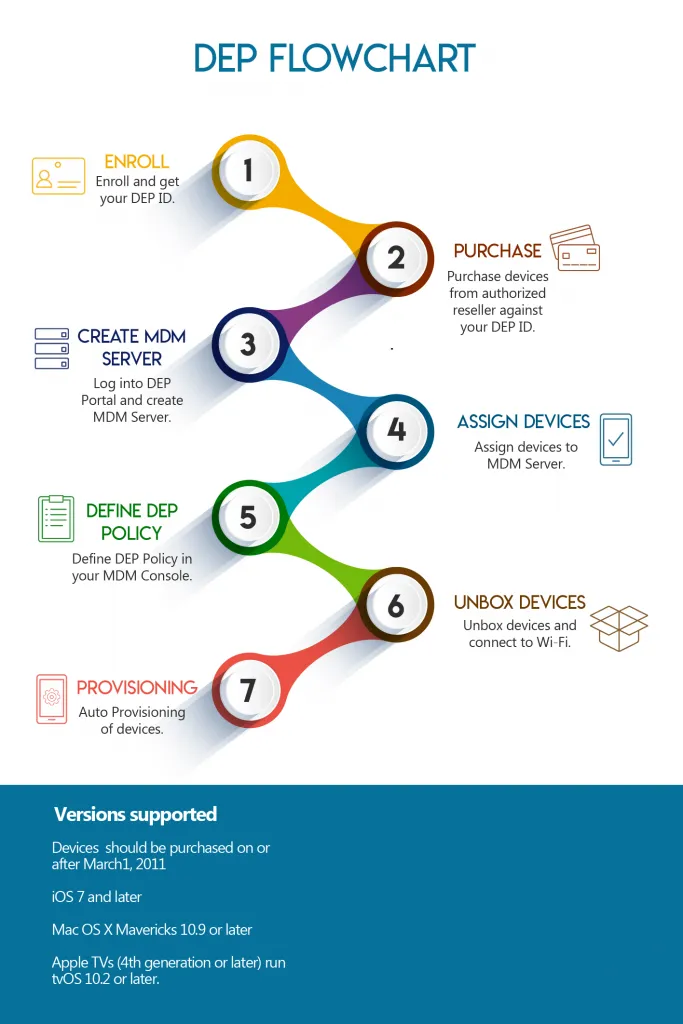
View the list of countries where Apple DEP is available here.
Google’s Zero Touch Enrollment (ZTE)
Google’s Zero Touch is a feature designed to ease the mass deployment process for Android devices. Zero Touch Enrollment feature not only simplifies the entire deployment task but also it saves costs and time.
ZTE supports Google Pixel and other modern devices running Android 7.0 or newer versions. Most modern Android hardware shipped today includes native, standardized support for Zero Touch capabilities out-of-the-box, ensuring zero-touch profile enforcement works automatically upon first device activation.
Features:
- Fast, Easy and Secure: Android devices are a primary choice for mass deployment in businesses. Zero touch provides a seamless, fast, easy and secure way of deploying Android devices on a mass scale. Unlike the manual configuring of devices, ZTE provides an automatic and simple step to follow that makes the devices ready for use, right after its purchase.
- Simplifying device provisioning: Mass provisioning of devices manually has been a cumbersome task. With ZTE, IT can deploy corporate-owned devices in bulk without having to manually setup each device. Users can start using the devices with management, apps and configurations setup, right out of the box.
- Enforced management: IT can enforce automatic installation of apps on devices enrolled with ZTE. Employees can directly start using the devices setup with necessary policies and apps by their EMM providers.
How to enroll with Zero Touch Provisioning (ZTP)
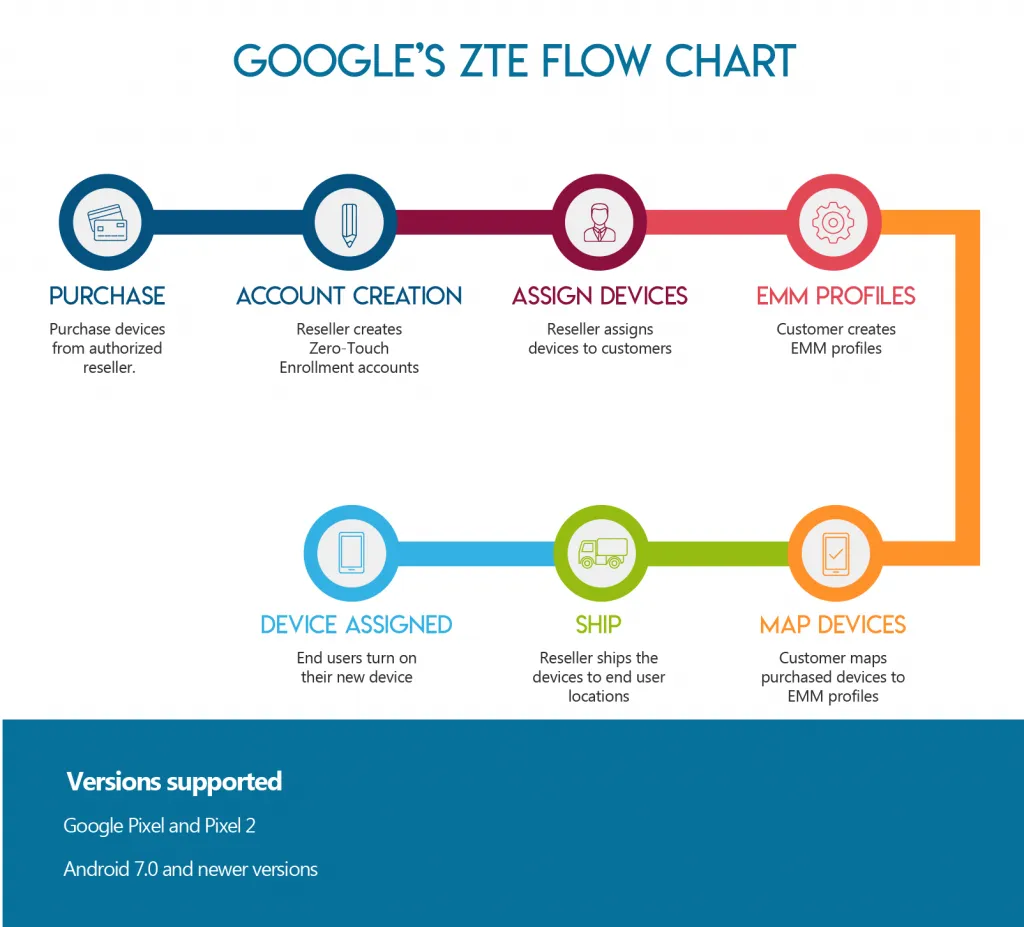
Samsung - Knox Mobile Enrollment (KME)
Samsung offers a seamless device enrollment plan that helps organizations to control and manage the devices invading their workplaces. This ensures that the devices do not become gateways for security risks during unsupervised and unapproved configuration. This viable solution is helping companies to save productive hours and cost on manual labor.
Features:
- Automatic configuration: With Knox mobile enrollment, companies can streamline the mass deployment process. Once devices are registered with KME portal, on every hard reset, devices re-provision themselves as per the policy defined by IT admin. This makes the entire process easier than ever before.
- Easy MDM enrollment: Unlike the manual provisioning of devices, the Knox mobile enrollment process automatically provisions all necessary MDM apps. Users only have to power on the devices, and click on install button which install the required software after and apply the security settings and configuration provisioned by the enterprise via MDM client.
- Mobile security management: IT Admin can set KME policy such that on every hard reset, devices force the end user to install EMM agent. Once EMM agent is installed and configured, using Samsung KNOX, it can impose advanced security policies on device to prevent any kind of data leakage which is possible if user install or uninstall any apps, or if a device is lost or stolen.
KME process flow
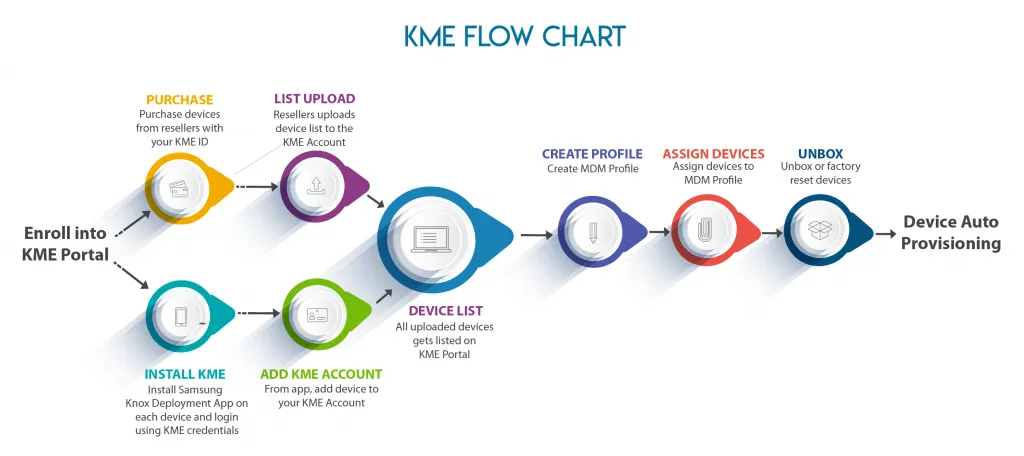
Zebra - StageNow
To provision Zebra Android devices, StageNow is a robust solution that allows any organization to easily stage multiple Android devices with a quick scan of a barcode or tap on an NFC tag. It allows simple profile creation and easy device deployment across ruggedized hardware platforms using barcode scans, tag reads, or audio configuration parameters.
Features:
- Simple and easy device staging: Staging profiles with all the settings, configurations and applications on Zebra devices has become very easy with StageNow application. It requires minimal efforts and no coding to set up the devices with required policies and apps as per organizations’ preferences.
- Automatic staging: Zebra provides options to stage the devices automatically either through barcode scanning or through NFC tag. Whether a company chooses to print and scan a barcode or simply place devices close to an NFC tag, the devices will automatically configure, eliminating the chances of error while saving time and cost of manual device provisioning.
- Powerful enterprise security options: StageNow enables enterprises to manage device security for wireless networks, including Wi-Fi networks, cellular, GPS and NFC. Additionally, it also manages USB ports, SD cards, cameras, browsers, applications via whitelisting and blacklisting.
- Scalability: StageNow provides scalability to enterprises which is efficient and effective. It can easily scale Zebra Android devices deployment architectures from a handful to hundreds of specialized field endpoints.
How to provision with Stage Now
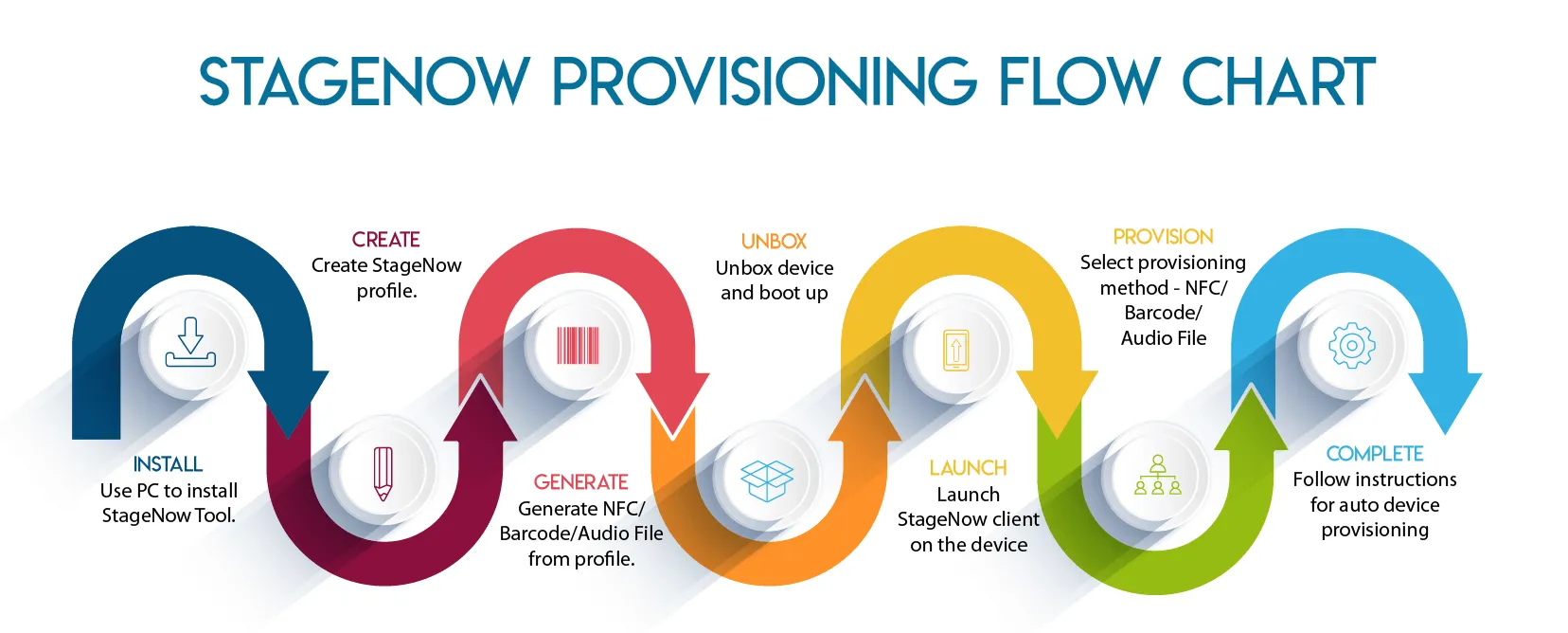
Microsoft’s Windows Autopilot
Microsoft’s Windows Autopilot is another option to deploy devices at larger scale. It applies natively to modern Windows enterprise environments. Windows Autopilot operates across multiple organizational structures, balancing cloud-managed deployments, native corporate directories, and administrative environments.
Features:
- Pre-register devices without user intervention: It enables users to pre-register devices through the Windows Autopilot Deployment Program with no additional intervention required from user’s side.
- Configure devices with higher control: This scenario is suited where IT Admin requires higher level of control over the provisioning process. To configure devices on-premises or cloud-based solutions, the Windows Configuration Designer can be used to help automate the process.
- Set up school PCs: This solution is specifically designed for technical staff members at a school, where they have to set up PCs for students. The Set up School PCs app help them to set up PCs in a simpler and faster way.
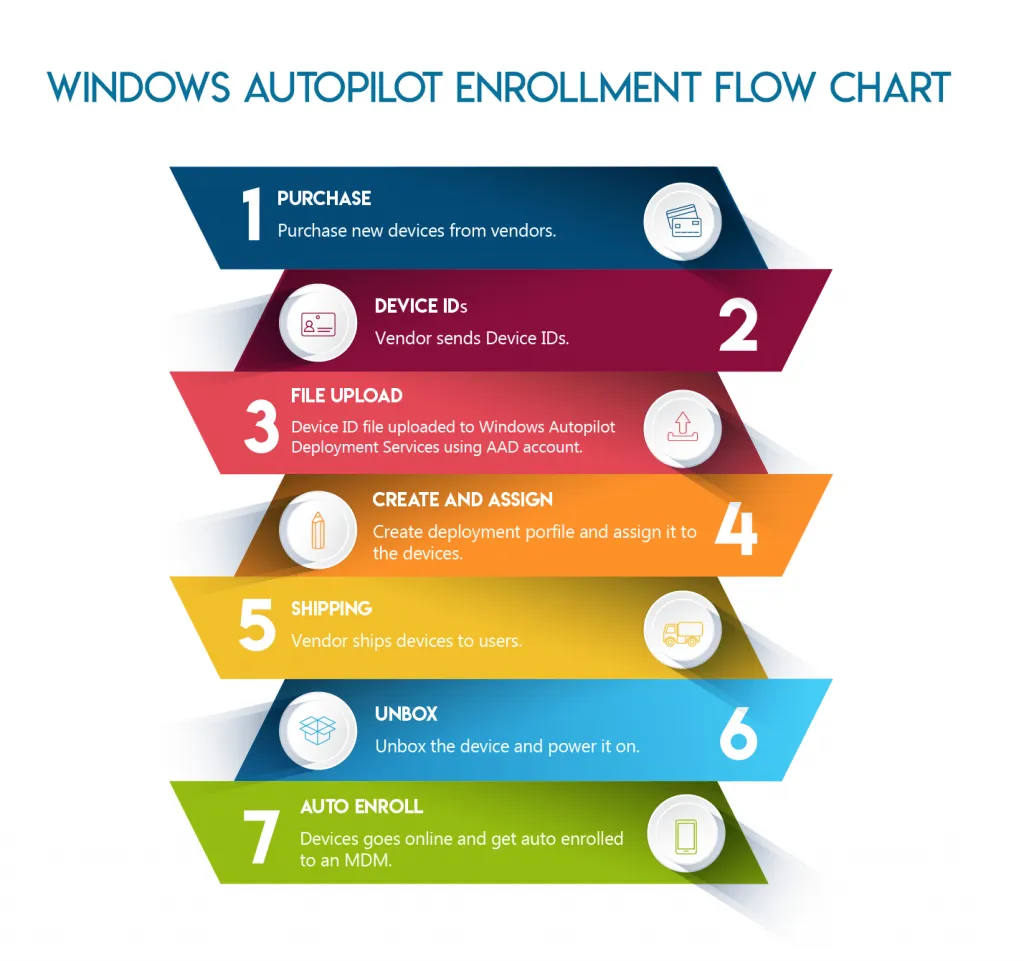
Essential steps to enroll in Windows Autopilot
Device deployment programs are a revolutionary step in making the process of manual deployment easy and cost effective. Apple, Google, Samsung, Zebra and Microsoft are continuously striving to solve the challenges associated with manual deployment programs faced by enterprises. However, these programs still have the scope to develop and enhance their capabilities in order to serve all enterprise's needs.
Additionally, EMM solutions are also required to be integrated with deployment programs. But unfortunately, not all EMM solutions have capabilities to integrate with deployment programs easily. So, it is very important to check with the EMM vendors whether their solutions can support these programs or not.
In a nutshell, organizations looking for a mass deployment program should always consider the devices type, device OS and versions, compatibility with the EMM solution. As not all devices, OS, versions and EMM solutions can be supported by all deployment programs.
42Gears EMM solution can be well integrated with all deployment programs. 42Gears is an Apple DEP partner, Google Android EMM partner, Samsung Knox Partner and Zebra StageNow Certified Vendor.